
Flower Learning Dashboard
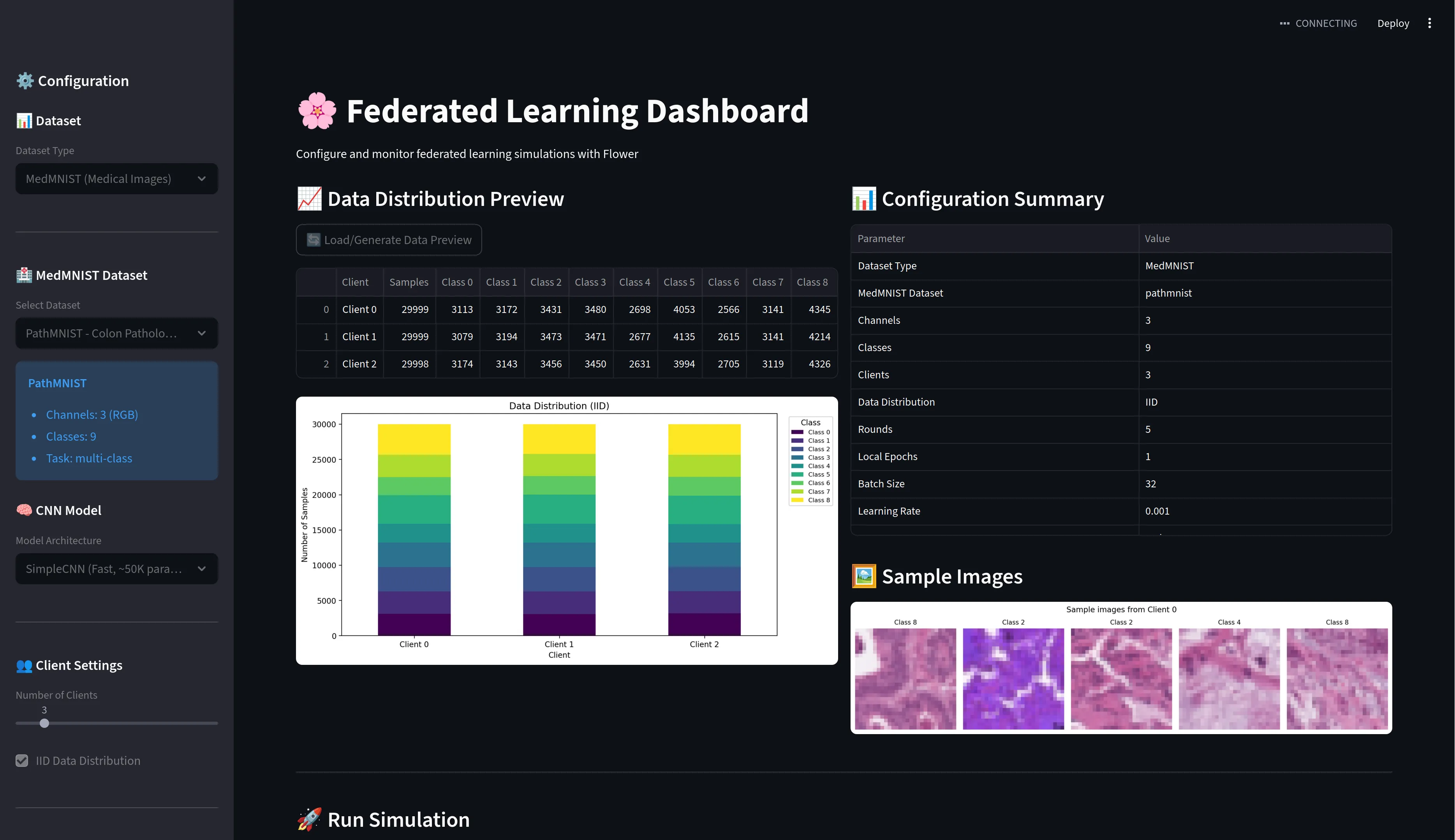
An interactive Streamlit dashboard for exploring Federated Learning (FL) concepts, including domain shift, aggregation strategies, and the benefits of FL for biased data distributions. Based on the Flower framework.
Hereditary FL - Federated Learning Demo
An interactive Streamlit dashboard for exploring Federated Learning (FL) concepts, including domain shift, aggregation strategies, and the benefits of FL for biased data distributions.



🚀 Quick Start
# 1. Clone the repository
git clone https://github.com/kalpathy/hereditary_fl.git
cd hereditary_fl

# 2. Create and activate virtual environment
python -m venv .venv
source .venv/bin/activate  # On Windows: .venv\Scripts\activate

# 3. Install dependencies
pip install -r requirements.txt

# 4. Run the Streamlit dashboard
streamlit run app.py
The dashboard will open at http://localhost:8505
📋 Features
Datasets
| Dataset | Description | Use Case |
|---|---|---|
| ColorMNIST | Synthetic colored MNIST with controllable domain shift | Demonstrates how FL helps with biased/spurious correlations |
| MedMNIST | Real medical imaging datasets (PathMNIST, DermaMNIST, etc.) | Realistic federated medical imaging scenarios |
| Synthetic | Generated classification data with configurable IID/non-IID splits | Quick experiments and baseline comparisons |
FL Strategies
| Strategy | Description | Key Hyperparameters |
|---|---|---|
| FedAvg | Federated Averaging - baseline strategy | - |
| FedProx | Adds proximal term for heterogeneous data | proximal_mu (0.01-1.0) |
| FedAdam | Server-side Adam optimizer | server_lr, tau |
| FedYogi | Server-side Yogi optimizer (adaptive) | server_lr, tau |
| FedAdagrad | Server-side Adagrad optimizer | server_lr, tau |
| FedAvgM | FedAvg with server-side momentum | server_lr, server_momentum |
🎯 Key Demo: ColorMNIST Domain Shift
The ColorMNIST demo shows why Federated Learning is valuable when clients have biased data:
Setup
4 sites with different color-label correlations:
- Site 0: 90% correlation (digit 0 = red, digit 1 = blue, etc.)
- Site 1: 70% correlation
- Site 2: 50% correlation
- Site 3: 30% correlation (near random)
Global test set: 0% correlation (completely unbiased)
Expected Results
| Site | Local Accuracy | Global Accuracy (after FL) |
|---|---|---|
| Site 0 (90% bias) | 2-10% | ~95% |
| Site 1 (70% bias) | 10-20% | ~95% |
| Site 2 (50% bias) | 40-50% | ~95% |
| Site 3 (30% bias) | 60-70% | ~95% |
Key Insight: Sites with the most biased data (Site 0) benefit the most from FL!
FedAvg vs FedProx
- FedProx typically outperforms FedAvg by 1-2% on heterogeneous data
- The proximal term helps prevent client drift when data distributions differ
📁 Project Structure
hereditary_fl/
├── app.py                  # Main Streamlit dashboard (run this!)
├── requirements.txt        # Python dependencies
│
├── medmnist_utils.py       # MedMNIST & ColorMNIST data loading
├── data_utils.py           # Synthetic data generation
├── cnn_model.py            # CNN models for image classification
├── model.py                # Simple MLP model for synthetic data
│
├── client.py               # Flower client implementation (FedAvg)
├── fedprox_client.py       # Flower client with FedProx support
├── server.py               # Basic FL server setup
│
├── test_*.py               # Test files for validation
├── compare_fedavg_fedprox.py # Script for strategy comparison
└── run_simulation.py       # Standalone simulation script
🛠️ Usage Guide
Running the Dashboard
streamlit run app.py
Sidebar Controls
- Dataset Type: Choose ColorMNIST, MedMNIST, or Synthetic
- Strategy: Select aggregation strategy (FedAvg, FedProx, etc.)
- Hyperparameters: Configure
proximal_mu,server_lr, etc. - FL Settings: Set number of rounds, clients, samples
Running a Simulation
- Configure your settings in the sidebar
- Click "Start Simulation"
- Watch real-time progress and metrics
- Review per-client and global accuracy charts
Running Tests
# Test all strategies
python test_strategies.py

# Test ColorMNIST domain splitting
python test_domain_split.py

# Test ColorMNIST generation
python test_colormnist.py
Standalone Simulation
# Basic FL simulation (no UI)
python run_simulation.py

# Compare FedAvg vs FedProx
python compare_fedavg_fedprox.py
⚙️ Configuration
Environment Variables
No environment variables required - all configuration is done through the Streamlit UI.
Streamlit Port
The app runs on port 8505 by default. To change:
streamlit run app.py --server.port 8501
GPU Support
The app automatically uses CUDA if available. Check with:
import torch
print(torch.cuda.is_available())
📊 Understanding the Results
Metrics Displayed
- Local Accuracy: Each client's accuracy on the unbiased test set
- Global Accuracy: Aggregated model's accuracy on the unbiased test set
- Training Loss: Per-round training loss for each client
Interpreting ColorMNIST Results
- Low local accuracy for high-correlation sites = model learned spurious correlation
- High global accuracy after FL = FL successfully debiased the model
- The gap between local and global accuracy shows FL's value
🔧 Dependencies
flwr>=1.5.0- Flower FL frameworktorch>=2.0.0- PyTorch for neural networkstorchvision>=0.15.0- Image transformationsstreamlit>=1.30.0- Web dashboardmedmnist>=2.2.0- Medical imaging datasetsnumpy,pandas,matplotlib,seaborn- Data processing and visualizationscikit-learn- Data splitting utilities
🐛 Troubleshooting
Common Issues
"Port already in use"
# Kill existing Streamlit process
pkill -f streamlit
# Or use a different port
streamlit run app.py --server.port 8506
"No module named 'flwr'"
# Ensure virtual environment is activated
source .venv/bin/activate
pip install -r requirements.txt
"CUDA out of memory"
- Reduce batch size or number of samples in the sidebar
- Or run on CPU (the app auto-detects this)
📚 Learn More
📝 License
MIT License - feel free to use and modify!
🤝 Contributing
- Fork the repository
- Create a feature branch
- Make your changes
- Run tests:
python test_strategies.py - Submit a pull request